

Diagram editor · CLI · MCP server
Diagrams that lay themselves out.
Write Mermaid, paste a draw.io file or just start drawing. Plota places the shapes, routes every connector around them and keeps long flows on the page — in your browser, with no account.
Mermaid in
flowchart LR
  user([Customer]) --> web[Web app]
  web --> api{API gateway}
  api -->|token| auth[Auth service]
  api -->|order| orders[Orders service]
  auth --> db[(Postgres)]
  orders --> db
  orders -.-> q[Event queue]
  q -.-> worker[Fulfilment worker]
  worker --> db
  worker --> done([Shipped])
  auth -.->|audit| q
- Free no account, no sign-up
- 13 Mermaid diagram types
- 68 shape kinds and stencils
- 136 tools for AI agents
One engine · three ways in
Draw it, script it, or let an agent ask for it.
- 01
The editor
A full canvas at editor.plota.live: 68 shape kinds, icons, numbered notes, overview and detail pages, a command palette and a shortcut for everything. Saves in your browser.
Open the editor - 02
The
plotaCLIMermaid or Plota JSON in; SVG, PNG, JSON or Mermaid out.
On npm soonrender,critique(a gate for CI),viewsandbootstrap, with a live--watchpreview. Node.js 22, no browser. - 03
The MCP server
136 tools for Claude, GitHub Copilot in VS Code or the OpenAI Agents SDK. Every result is an SVG plus an editable Plota file, opened in an interactive viewer where the host supports MCP Apps.
See it work
Mermaid in · diagram out
Paste the text. Get a diagram you can edit.
13 Mermaid diagram types become real shapes and connectors — laid out, routed, and yours to move. Each plate below is the SVG export of the source under it, made by the same engine when this page was built. Drop one into the editor and it opens as the original document.
- Fig. 2
C4 context
C4Context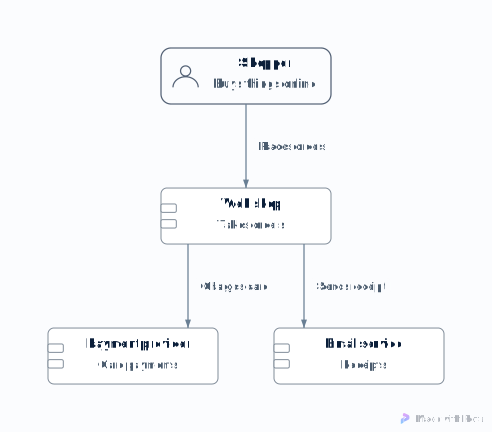
Mermaid source
C4Context title Checkout system Person(shopper, "Shopper", "Buys things online") System(shop, "Web shop", "Takes orders") System_Ext(pay, "Payment provider", "Card payments") System_Ext(mail, "Email service", "Receipts") Rel(shopper, shop, "Places orders") Rel(shop, pay, "Charges card") Rel(shop, mail, "Sends receipt") - Fig. 3
Architecture
architecture-beta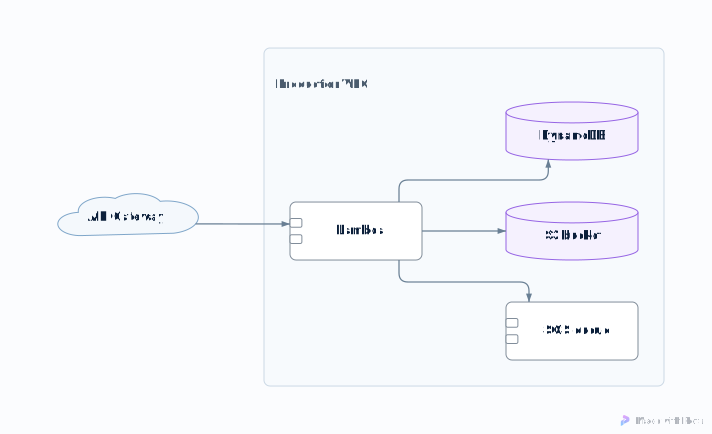
Mermaid source
architecture-beta group vpc(cloud)[Production VPC] service gw(internet)[API Gateway] service fn(server)[Lambda] in vpc service tbl(database)[DynamoDB] in vpc service bucket(disk)[S3 bucket] in vpc service q(server)[SQS queue] in vpc gw:R --> L:fn fn:R --> L:tbl fn:B --> T:bucket fn:T --> B:q - Fig. 4
Entity relationship
erDiagram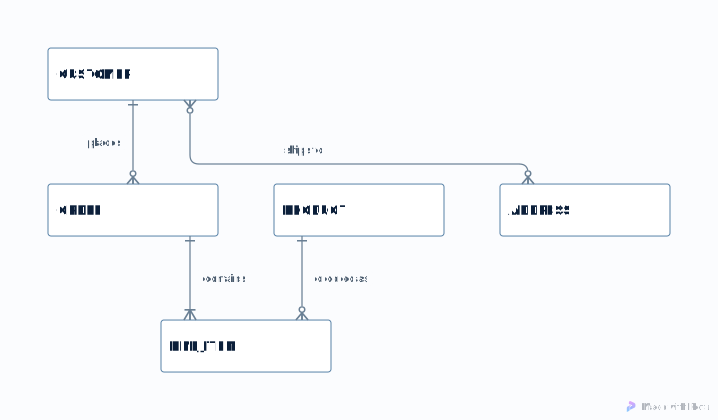
Mermaid source
erDiagram CUSTOMER ||--o{ ORDER : places ORDER ||--|{ LINE_ITEM : contains PRODUCT ||--o{ LINE_ITEM : "ordered as" CUSTOMER }o--o{ ADDRESS : "ships to" - Fig. 5
State machine
stateDiagram-v2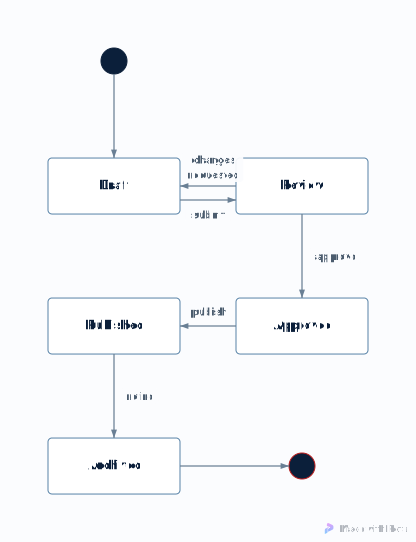
Mermaid source
stateDiagram-v2 [*] --> Draft Draft --> Review: submit Review --> Draft: changes requested Review --> Approved: approve Approved --> Published: publish Published --> Archived: retire Archived --> [*] - Fig. 6
Sequence
sequenceDiagram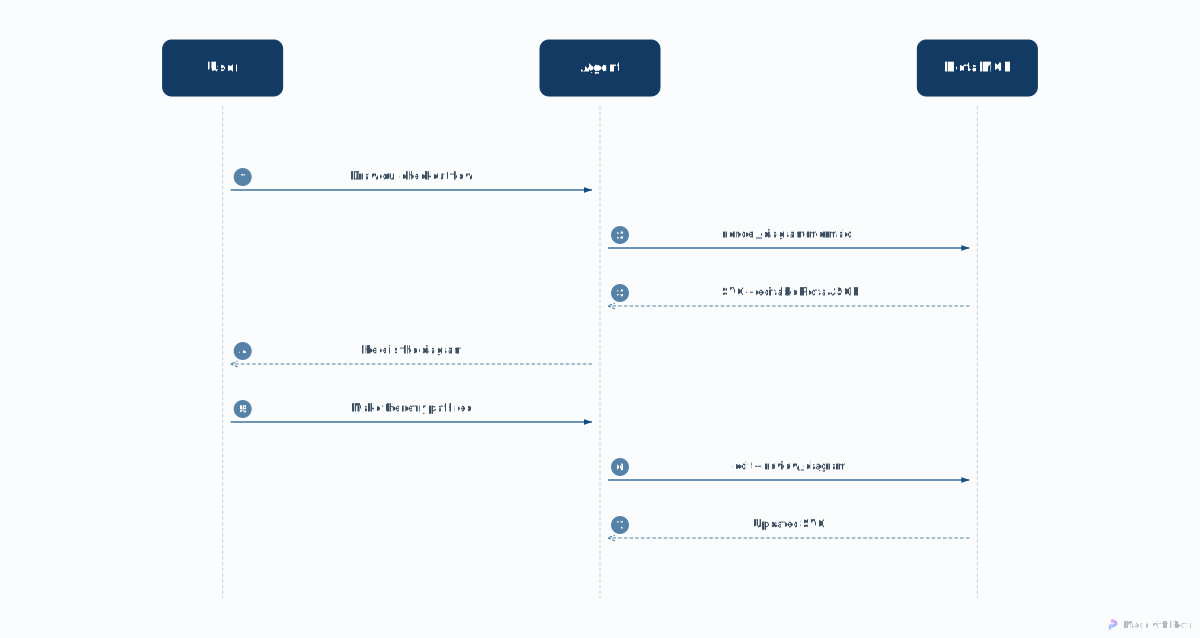
Mermaid source
sequenceDiagram
  participant U as User
  participant A as Agent
  participant P as Plota MCP
  U->>A: Draw our checkout flow
  A->>P: render_diagram(mermaid)
  P-->>A: SVG + editable Plota JSON
  A-->>U: Here is the diagram
  U->>A: Make the retry path red
  A->>P: edit + review_diagram
  P-->>A: Updated SVG
Reads
- flowchart / graph
- sequenceDiagram
- classDiagram
- stateDiagram-v2
- erDiagram
- C4 (Context … Deployment)
- architecture-beta
- block-beta
- gitGraph
- mindmap
- timeline
- journey
- requirementDiagram
Charts such as gantt, pie and xychart are refused by name instead of being drawn wrong.
For AI agents & pipelines
Your agent draws. You get a file you can edit.
Over the Model Context Protocol, agents get one-call tools to render Mermaid, build a diagram from a compact spec with real service icons, check it and fix it. It runs locally over stdio, or over Streamable HTTP with bearer-token authentication.
- render_diagram({ mermaid: "flowchart LR …" })
- SVG + editable Plota JSON · opens in the viewer
- create_architecture_spec({ nodes: […], edges: […] })
- real service icons · notes numbered on badges
- critique_diagram()
- 18-rule critique · each finding carries a fix
- apply_critique_fix({ … })
- fixed · same document, still editable
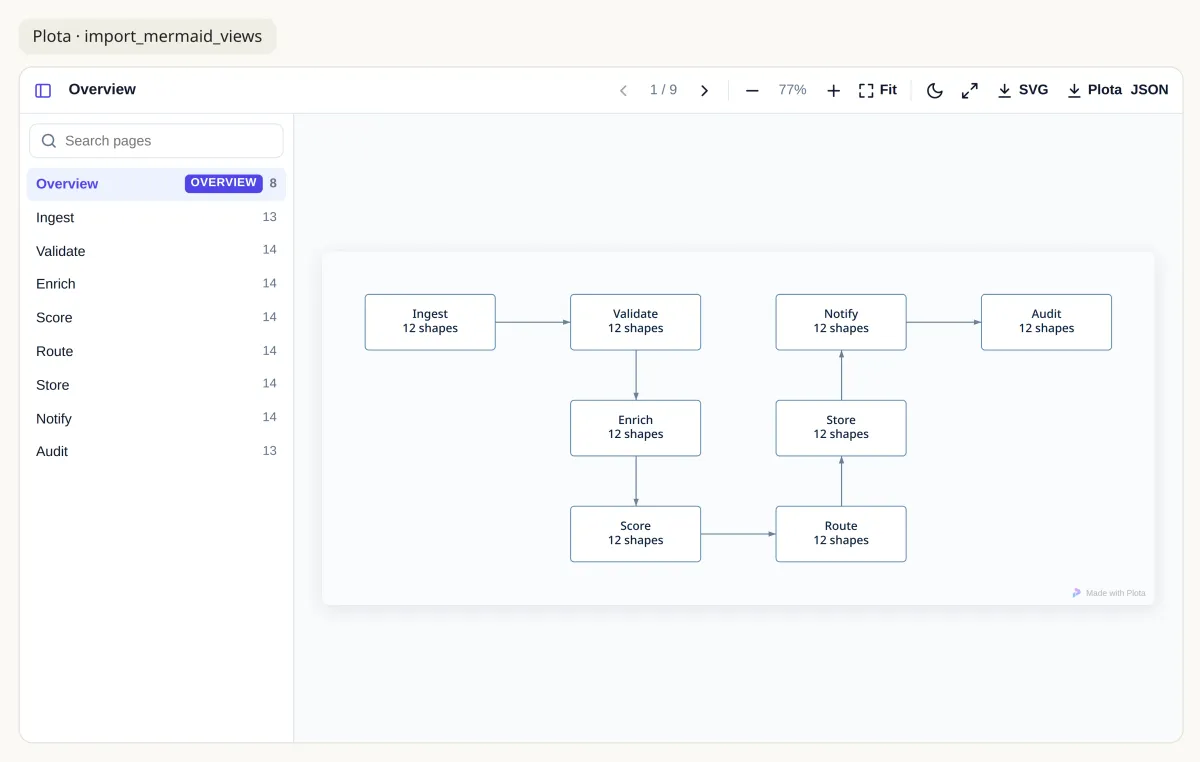
import_mermaid_views result: an overview page, then one page per section.In detail
Everything a diagram needs, nothing it doesn’t.
- A
Smart Route
Connectors go around shapes and frame titles, busy sides spread their arrows out, crossings get a visible hop, and decision branches leave from the diamond’s points. Press R.
- B
Long flows that fit the page
Long step-by-step processes and wide fan-outs fold into balanced, aligned rows instead of a thin strip you have to zoom into, and retry loops are drawn clear of the steps around them.
- C
68 shape kinds, real icons
29 core kinds and 39 stencils — BPMN 2.0, UML, ERD, network, tables — plus AWS architecture icons. Change a shape’s kind and keep its text, size and connections.
- D
A critique that suggests fixes
18 rules check layout, labels and structure on your device and propose fixes; applying one is a single undo. 14 design checks flag layout and routing defects.
- E
Overview and detail pages
A big diagram splits into an overview page plus one detail page per section, in the editor, the CLI and over MCP.
- F
AI only if you ask
Bring a model if you want one — Ollama, an OpenAI-compatible endpoint or WebLLM in the browser. Diagram data is not sent to an AI provider unless you configure one and invoke it.
- G
No account, your files
Open the editor and the canvas is there. Ctrl/⌘ S saves in this browser; Plota JSON exports the whole multi-page document when you want a copy that lasts.
- H
Built for fast hands
A command palette, a format painter, named styles and a shortcut map checked against the app’s real key bindings: C connector, J hops, Ctrl/⌘ I AI command bar.
Import & export
Bring everything in. Send it anywhere.
In
- draw.io .drawio files
- Lucidchart paste, or Lucid’s HTML export
- PlantUML a focused, well-tested subset
- Mermaid 13 diagram types
- SVG a Plota SVG reopens as its document
- PNG · JPEG as images on the canvas

Out
- SVG fonts embedded, editable inside
- PNG for slides and chat
- PDF for print
- draw.io .drawio
- Mermaid back to text
- Plota JSON the whole multi-page document
Anything approximated on the way in is flagged as a warning, never dropped silently.
Questions
Frequently asked questions
What is Plota?
Plota is a free diagram editor that runs in your browser at editor.plota.live. It lays out shapes automatically, routes connectors around them and has 68 shape kinds. The same engine also runs headlessly as the plota command-line tool and as an MCP server that AI agents can call.
Do I need an account?
No. Open the editor and start drawing — there is no sign-up. Ctrl/⌘ S saves the diagram in your browser's storage, and exporting Plota JSON gives you a portable copy of the whole multi-page document.
Is my diagram sent to a server?
Editing happens in your browser. Diagram data is not sent to an AI provider unless you configure one (Ollama, an OpenAI-compatible endpoint, or WebLLM in the browser) and invoke it. Browser storage can be cleared with site data, so export Plota JSON for a backup.
Which Mermaid diagram types does Plota read?
Flowchart, sequence, class, state, ER, C4, architecture-beta, block-beta, gitGraph, mindmap, timeline, journey and requirement diagrams become editable shapes and connectors. Chart types such as gantt, pie and xychart are recognised and refused by name rather than drawn incorrectly.
Can I import draw.io, Lucidchart or PlantUML diagrams?
Yes. Plota imports draw.io files, Lucidchart content pasted from the clipboard or opened from Lucid's HTML export, a well-tested subset of PlantUML, Mermaid, SVG and images. It exports SVG, PNG, PDF, draw.io, Mermaid and Plota JSON, and an SVG exported by Plota imports back as the original document.
How do AI agents use Plota?
Plota's MCP (Model Context Protocol) server gives agents such as Claude, GitHub Copilot in VS Code or the OpenAI Agents SDK one-call tools to render Mermaid, build diagrams from a compact spec, check them and fix them. Results come back as SVG plus an editable Plota file, with an interactive viewer for hosts that support MCP Apps. It runs locally over stdio or over Streamable HTTP with bearer-token authentication.
What does the plota CLI do?
plota render compiles Mermaid or Plota JSON to SVG, PNG, JSON or Mermaid (with a --watch live preview); plota critique audits layout quality and can fail a CI build; plota views splits a sectioned flowchart into an overview page plus one detail page per section; plota bootstrap drafts an architecture diagram for a project. It needs Node.js 22 or later and no browser, and it is coming to npm soon.
Your next diagram is one tab away.
Diagrams saved in browser storage are removed when site data is cleared — export Plota JSON for a portable backup. Optional integrations may have their own data handling.